

Add external SMB / CIFS backend
The external SMB / CIFS backend lets you put VM rootfs files on any SMB share — a Samba server, a Windows share, a NAS appliance — without baking vendor-specific code into the platform. Each VM gets a .raw file on the share; the agent mounts the share once and reuses the mount across VMs on the same backend.
New in v0.4.0 (2026-05-14) and parallels the external NFS backend shipped in v0.3.0.
When to use it
- You already have a Samba or Windows SMB server and want VM rootfs files to live there.
- You need shared file-level storage but can’t run NFS (e.g. mixed Windows + Linux environment).
- You’re using a NAS appliance that speaks SMB (Synology, QNAP, etc.).
If you want block-level shared storage instead, use the external iSCSI backend.
Prerequisites
On the host running the agent:
cifs-utilspackage (installed automatically by the installer in v0.4.0+).- The
cifskernel module — pulled in bymount.cifson first use, no manualmodprobeneeded. - Network reachability to the SMB server’s TCP port 445.
On the SMB server:
- A share that allows write access for either an authenticated user or guest.
- SMB protocol version 2.0 or higher (SMB1 is rejected by
mount.cifson modern kernels).
Adding an SMB backend
Go to Storage → Add backend. In the dialog, set Kind to SMB / CIFS.
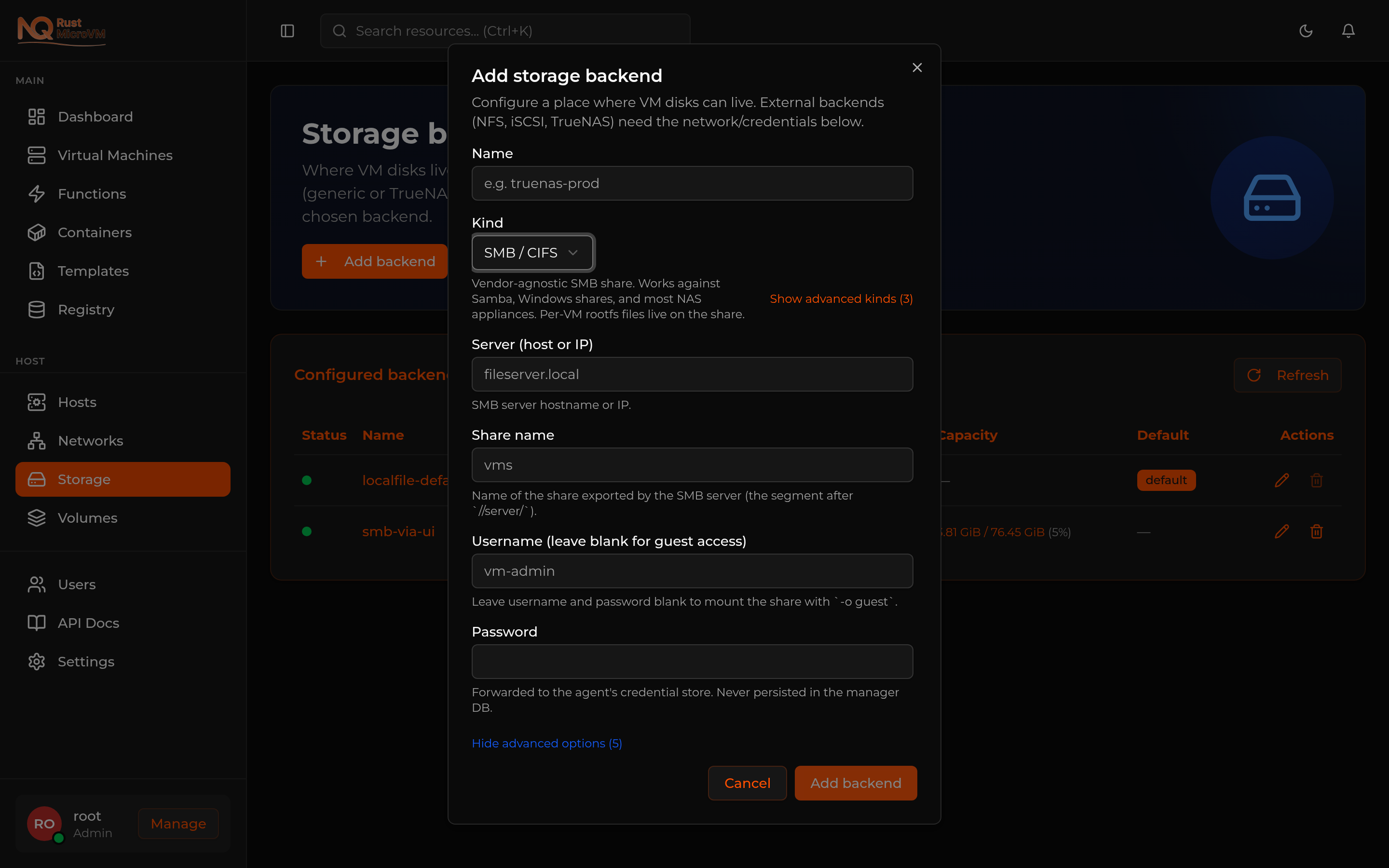
Basic fields
| Field | Required | Notes |
|---|---|---|
| Name | Yes | Backend identifier, e.g. smb-prod |
| Server | Yes | Hostname or IP (e.g. nas.local, 192.168.1.50). IPv6 is supported — wrap in [] |
| Share name | Yes | The segment after //server/, e.g. vms for //nas.local/vms |
| Username | No | Leave blank for guest access (mount with -o guest) |
| Password | If username | Forwarded to the agent’s cred store at /etc/nqrust/storage-creds/<id>.cred (mode 0600). Never persisted in the manager DB |
Advanced fields (click Show advanced options)
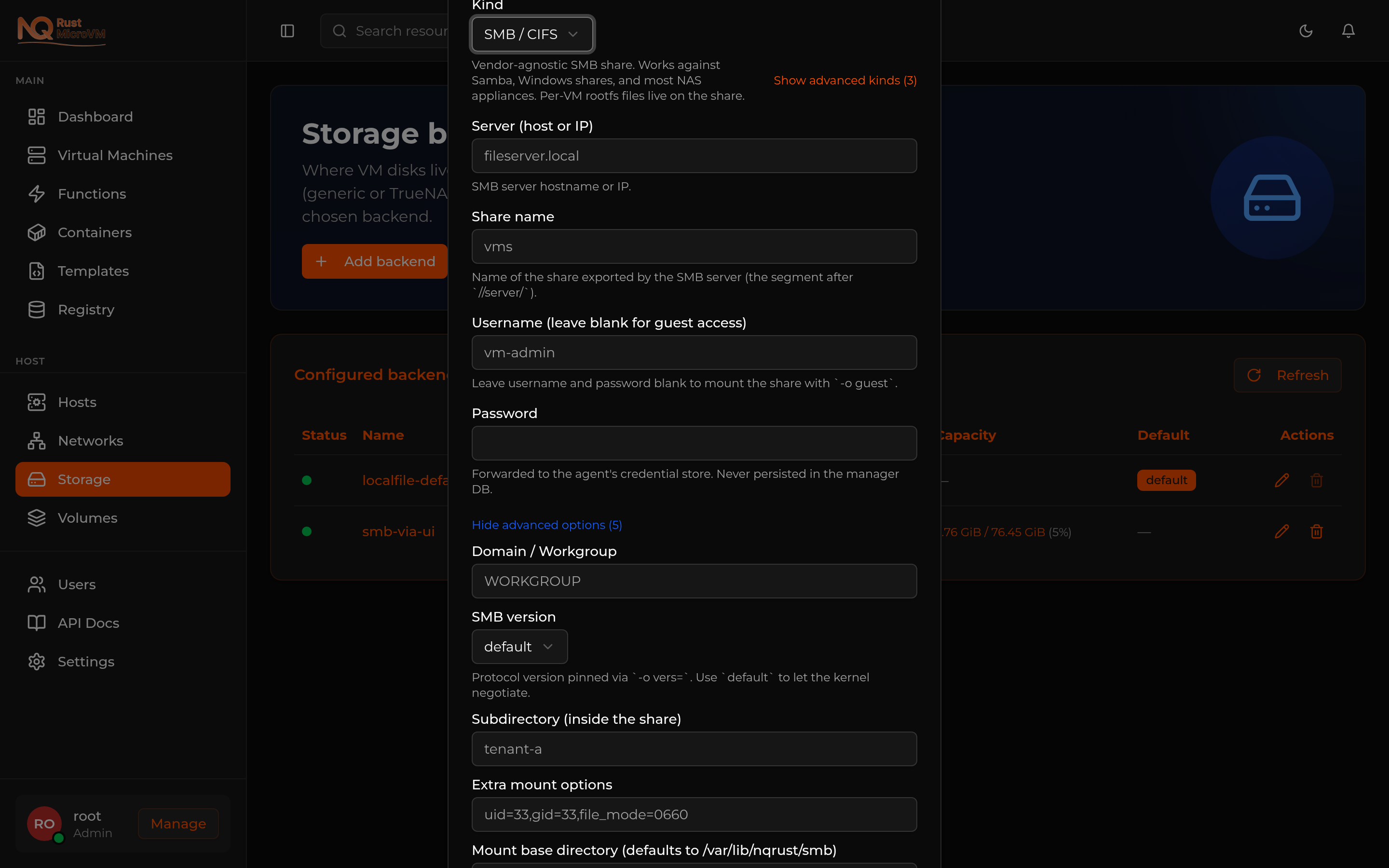
| Field | Default | Notes |
|---|---|---|
| Domain / Workgroup | — | For Active Directory shares, the AD domain or workgroup name |
| SMB version | default | Pin protocol version with -o vers=. Options: default (kernel negotiates), 2.0, 2.1, 3, 3.0, 3.11 |
| Subdirectory | — | Optional path inside the share, e.g. vm-rootfs if you want all VM files under //server/share/vm-rootfs/ |
| Extra mount options | — | Raw -o options appended to the mount command (advanced — e.g. uid=33,gid=33,file_mode=0660) |
| Mount base directory | /var/lib/nqrust/smb | Where on the host the agent mounts shares — defaults to a per-server-share subdirectory |
Click Add backend. The manager validates the form, forwards credentials to the agent, runs mount.cifs once to confirm reachability, then inserts the backend into the live registry. The Storage table now shows your SMB backend with live capacity from df.
Anonymous (guest) mode
Leave Username and Password blank. The agent runs mount.cifs //server/share /mount -o guest. No credential file is created.
Useful for legacy NAS appliances with a public read/write share, or for testing against a Samba server with map to guest = bad user.
Creating a VM on the SMB backend
In the Create VM wizard, Boot Source step (step 4), set the Storage backend dropdown to your SMB backend.
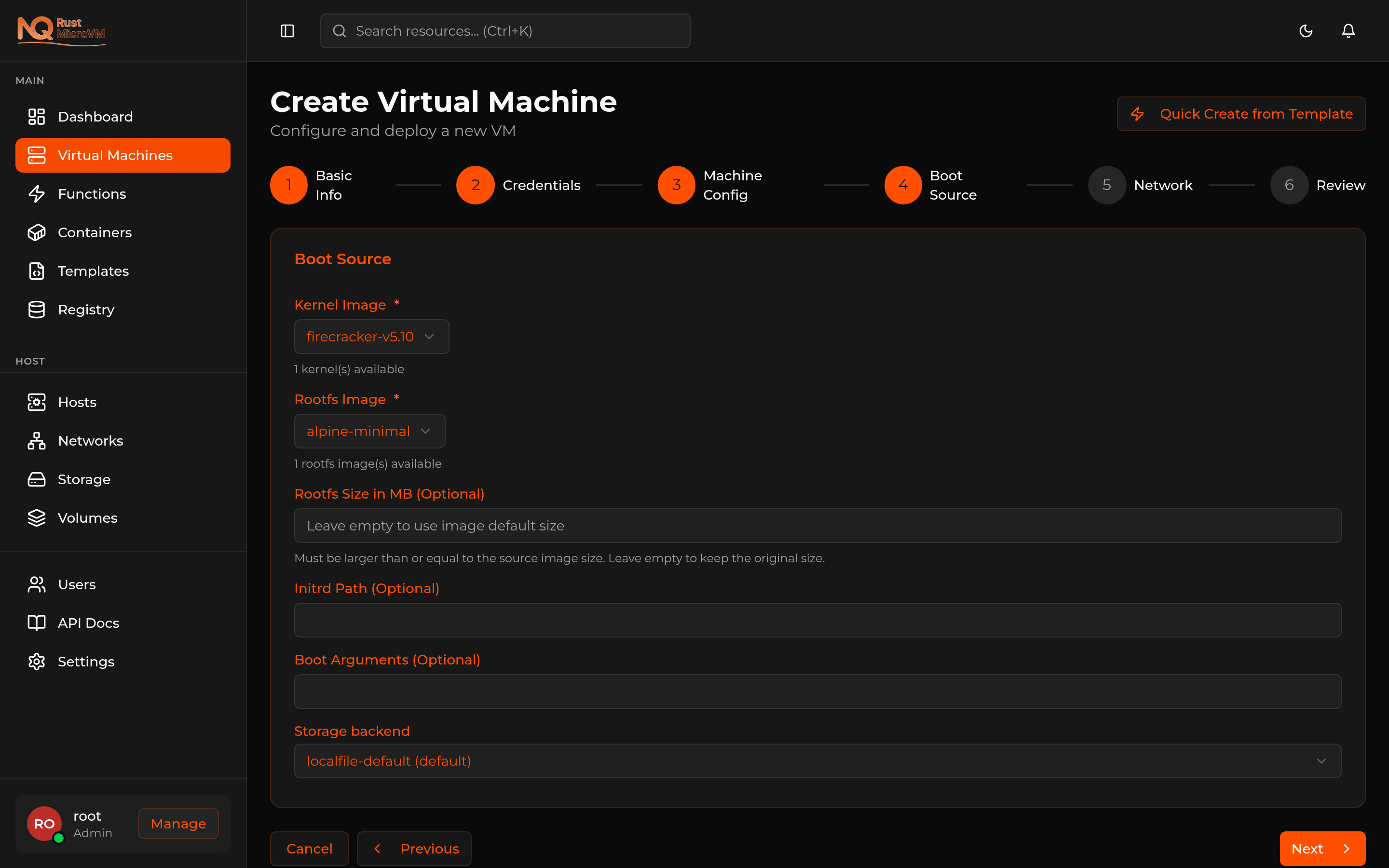
The dropdown lists every backend the manager knows about. Default backend is preselected; pick the SMB backend instead.
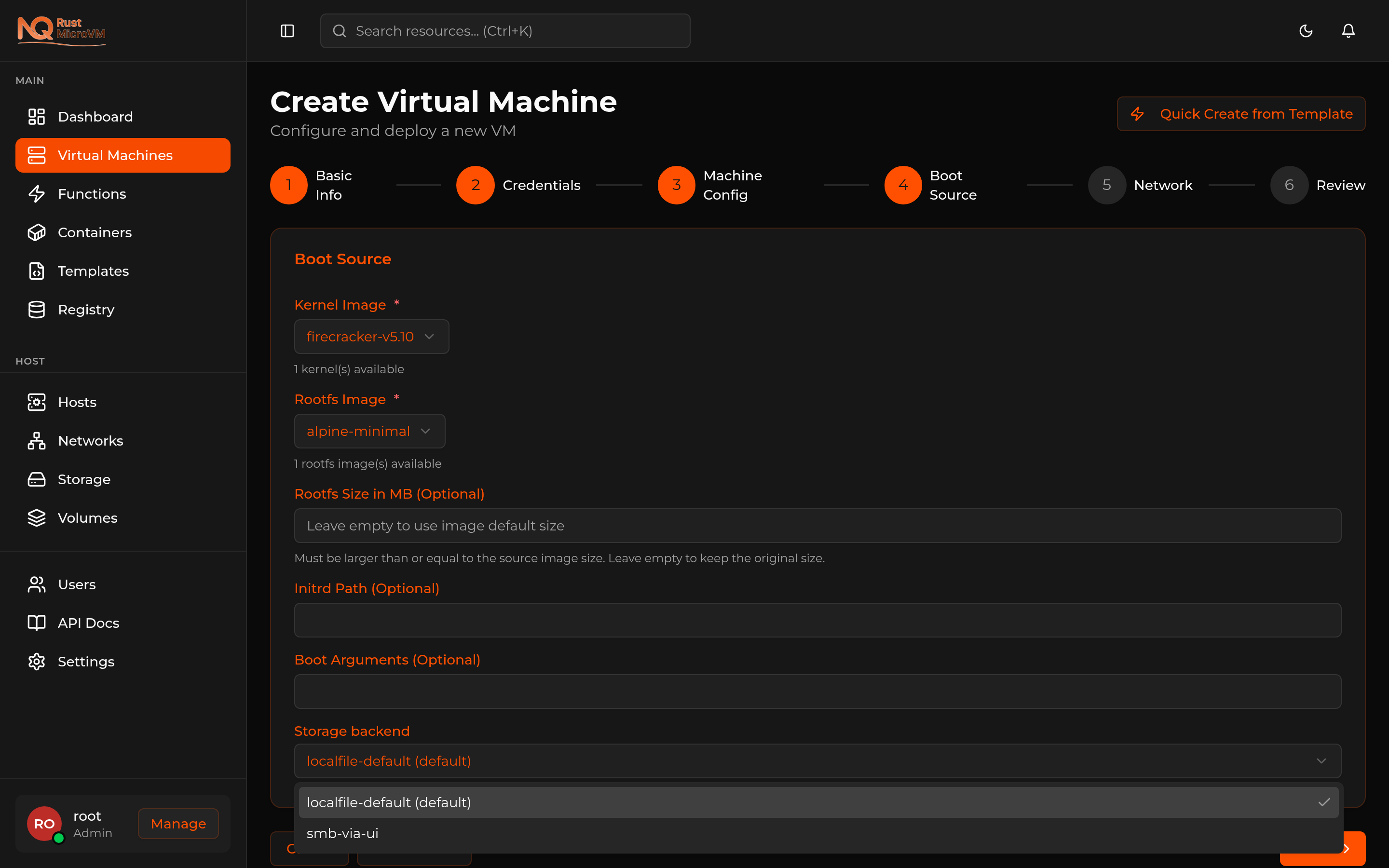
When the VM is created, the manager:
- Asks the backend to provision a rootfs. The backend asks the agent to clone the chosen base image into a new sparse file on the SMB share (e.g.
/var/lib/nqrust/smb/<server>:<share>/smb-<volume-id>.raw). - Records a
volumerow in the database pointing at that file. - Spawns Firecracker with the SMB-mounted file path as the rootfs.
Stop, start, and delete all work as expected. Restart re-attaches to the same file on the share — your data persists across stop/start cycles.
Rotating credentials
If your SMB share’s password changes (or you want to rotate it preventatively):
- Open Storage → click Edit on the SMB backend.
- The amber Rotate SMB password section appears for SMB-kind backends only.
- Type the new password and save.
The manager pushes the new password to the agent’s cred store; the existing mount is reused (no remount needed for currently-mounted shares — kernel CIFS uses the cached session). Future mounts use the new password.
Leave the rotate field blank when you only want to edit the config (server, share, etc.) without touching the password.
Removing an SMB backend
Click Remove on the backend row.
The manager:
- Refuses with HTTP 409 if there are live volumes on the backend (delete or migrate VMs first).
- Removes the backend row from the database.
- Notifies the agent to delete the credential file.
- Unmounts the share.
- Drops the entry from the live registry.
The rootfs files left on the share are not automatically deleted — same as the iSCSI-LVM pattern. Clean them up manually if needed.
Architecture
  ┌─────────────────┐     HTTP /v1/storage/smb/*     ┌─────────────────────┐
│  Manager        │ ──────────────────────────────▶│  Agent (root)       │
│  (unprivileged) │                                 │  /etc/nqrust/       │
│                 │                                 │  storage-creds/     │
│  Backend config │                                 │  <id>.cred (0600)   │
│  in Postgres    │                                 │                     │
│                 │                                 │  mount.cifs         │
│  (no password)  │                                 │  /var/lib/nqrust/   │
└─────────────────┘                                 │  smb/<server>:<sh>/ │
                                                    └─────────────────────┘
                                                              │
                                                              │ CIFS over TCP/445
                                                              ▼
                                                    ┌─────────────────────┐
                                                    │  Samba / Windows /  │
                                                    │  NAS appliance      │
                                                    └─────────────────────┘
The agent owns the privileged mount.cifs call. The manager never sees the host’s filesystem or the SMB server’s credentials at runtime — it only delivered them once, on backend create.
Troubleshooting
See the SMB troubleshooting runbook for the eight most common failure modes:
mount error(13): Permission denied— wrong password or usernamemount error(2): No such file or directory— wrong share name or server is reachable but share doesn’t existbad option— invalid-omount option or SMB version mismatch- Probe timeout / unreachable server
- Missing cred file on agent (recoverable via Edit → re-save password)